> For the complete documentation index, see [llms.txt](https://docs.fiingate.vn/manual/llms.txt). Markdown versions of documentation pages are available by appending `.md` to page URLs; this page is available as [Markdown](https://docs.fiingate.vn/manual/user-manual/fiingate-assistant.md).
# FiinGate Assistant
FiinGate Assistant is a virtual assistant for data exploration and financial analysis, integrated across all screens within the Company Analysis features of the FiinGate platform. It is designed to support users in querying information, interpreting financial figures, and conducting basic analyses through natural language, thereby improving data utilization efficiency and optimizing information processing workflows.
***
### 1. Purpose of Use
FiinGate Assistant is designed to:
• Help users better understand financial indicators and figures presented in financial reports.
• Enable data queries using natural language without requiring complex navigation.
• Provide quick analyses, period-based comparisons, and identify unusual fluctuations.
• Offer guidance on using Financial Statement (FS)/Financial Analysis (FA) features directly during user interaction.
FiinGate Assistant acts as an “analytical companion” throughout the corporate evaluation process.
**Note:** *FiinGate Assistant is available for users with FiinGate Standard plans or higher.*
***
### 2. Scope of FiinGate Assistant Features
The initial version of FiinGate Assistant focuses on corporate analysis; therefore, it is currently available only on the screens related to the Company Analysis feature. The scope and depth of analysis will be enhanced in subsequent releases. Future versions will expand the chatbot to provide guided user assistance across all screens that contain links to any features, enabling seamless navigation and operation through a single chat channel.
#### 2.1. Explanation of Financial Indicators & Terminology
FiinGate Assistant provides:
• Definitions and descriptions of accounting and financial indicators.
• Calculation formulas and component breakdowns.
• Explanations of factors affecting indicator fluctuations.
Value: helps users clearly understand report structures and content, especially for highly technical indicators.
#### 2.2. Summary and Extraction of Financial Information
The assistant is able to:
• Extract key highlights from financial reports by period.
• Summarize main trends in revenue, profit, expenses, assets, and equity.
• Highlight essential metrics for quick preliminary assessments.
Value: delivers an overall view in a short time, supporting initial analysis needs.
#### 2.3. Analysis and Comparison of Corporate Data
Supports various types of analysis, such as:
• Period-over-period comparisons (year/quarter/month).
• Assessing growth or decline trends.
• Analyzing fluctuations in key financial metrics.
Value: enables users to obtain quick insights without manual data compilation.
#### 2.4. Detection of Unusual Fluctuations
FiinGate Assistant can identify:
• Significant changes in revenue, expenses, profit, or related metrics.
• Abnormal signals compared to a company’s historical performance (when data allows).
Value: helps users detect potential risks early or identify issues that require deeper analysis.
#### 2.5. Extended Queries Beyond Current Screen Data
Users may ask questions beyond the currently displayed screen, including:
• Information about other companies.
• Metrics or reporting periods not shown in the current view.
• Concepts or topics related to financial analysis.
Value: enhances flexibility and allows comprehensive data exploration within the system.
#### 2.6. System Navigation Guidance
FiinGate Assistant can provide guidance on performing basic actions within FS/FA screens.
Value: reduces onboarding time and supports new users in navigating the platform effectively.
### 3. How to Use the Chatbot Feature
*(Applicable to all screens of Company Analysis feature)*
a. Access the Chatbot
To access FiinGate Assistant, follow the steps below:
\#1: Navigate to the company of interest.
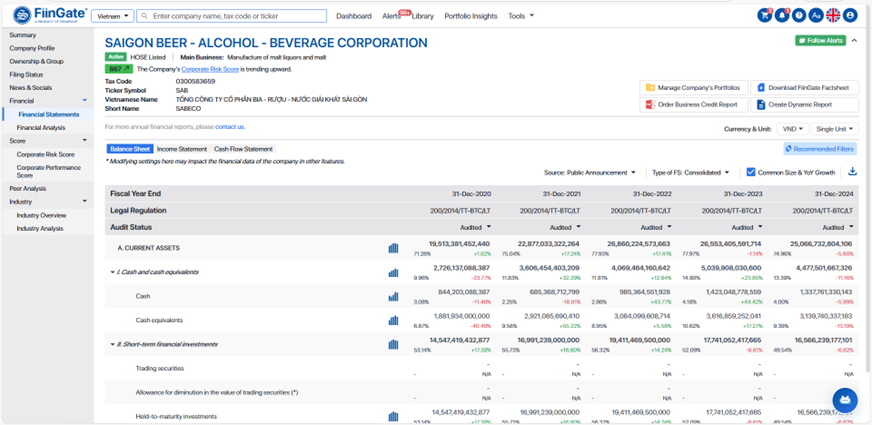
\#2: The Chatbot icon appears at the bottom-right corner of the interface.
\#3: Click the icon to open the conversation window.
b. Create New Conversation
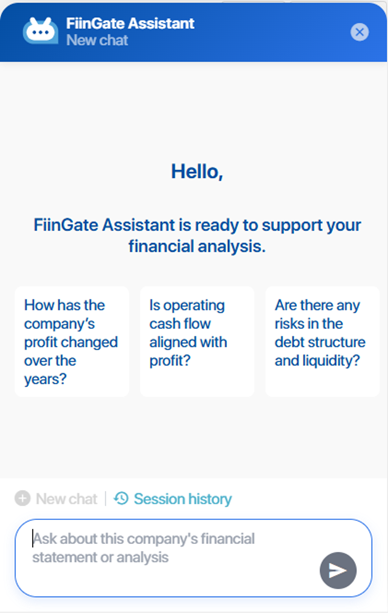
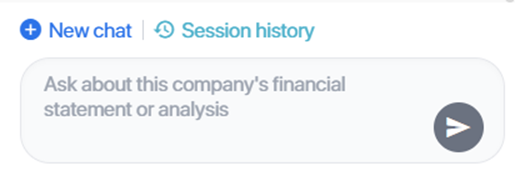
\#1: In the Chatbot conversation window, click “New chat”.
c. View History
\#1: In the Chatbot conversation window, click “Chat history.”
\#2: The chat history will be displayed; select the conversation you want to view.
### 4. Frequently Asked Questions (FAQ)
**Q1. What data sources does FiinGate Assistant use to generate responses?**
**A:** Responses are based on official data available within the FiinGate system, including financial statements, analytical metrics, and periodically updated corporate information.
**Q2. Can the assistant answer questions about a company not currently shown on the screen?**
**A:** Yes. Users may query any company within FiinGate’s data scope, even if they are not currently on that company’s screen.
**Q3. Can FiinGate Assistant export data or modify information?**
**A:** No. The assistant supports querying, explanation, and analysis only. Actions such as exporting reports, editing data, or changing configurations must be done through system functions.
**Q4. Does the assistant support English?**
**A:** Yes. FiinGate Assistant supports both Vietnamese and English. Users may ask questions in either language.
**Q5. Why does the assistant sometimes ask for clarification?**
**A:** This may occur if the query is too broad, lacks company or period information, or has multiple possible interpretations. Clarifying helps ensure accurate responses.
**Q6. Does the assistant perform advanced analytics or forecasting?**
**A:** The assistant currently supports descriptive analytics, including period comparisons, trend identification, and summarization. Advanced analytics — such as forecasting, modeling, or risk simulations — may not be supported depending on the case.
**Q7. Can I view previous queries?**
**A:** Yes. Users can view the conversation history within the FiinGate Assistant window for continuity in analysis.
**Q8. Why might the assistant’s response differ from values shown in reports?**
**A:** Responses are based on the same data; differences may occur if the user is viewing another reporting period, if reports have multiple versions, or if the query was interpreted differently. Providing specific details helps maintain accuracy.
**Q9. Is there a limit to the number of questions per session?**
**A:** No. Users can ask unlimited questions within an active login session.